

In today's highly informationized industrial environment, wireless communication technology plays a crucial role. Industrial wireless device routers, especially 4G routers and their WiFi capabilities, have become a key component in connecting field devices and enabling remote data transmission and monitoring. However, for many technicians and managers, how to efficiently and securely enter and manage these industrial routers is still a topic worthy of in-depth discussion.industrial router
industrial wireless equipment router overview
Industrial wireless equipment routers are designed for harsh industrial environments with high reliability, strong anti-interference capability and wide coverage. They not only support the traditional wired network connection, but also integrate the 4G cellular network and WiFi wireless LAN function, making the data exchange between devices more flexible and convenient. Driven by trends such as Industry 4.0 and smart manufacturing, these routers have become indispensable infrastructure for remote monitoring, predictive maintenance and intelligent production.wireless router
2. Basic steps for entering the router management interface
To effectively manage an industrial wireless device router, you first need to successfully log in to its management interface. Here is the common login process:
Connect to the network: Make sure your computer or mobile device is connected to the router's WiFi network (if enabled), or directly to the router's LAN port via a network cable.4G industrial router
Find the IP address: The default management IP address of most routers is printed on the bottom label of the device, or check the default gateway address through a command line interface (such as ipconfig in Windows cmd).
Open the browser: Enter the management IP address of the router in the address bar. The login page is usually displayed after you press enter.
Enter username and password: The default username and password can also be found on the label or instruction manual at the bottom of the router when you first log in. To be on the safe side, change these default credentials immediately after your first login.
the special management points of 4G routers for industrial wireless equipment
For the industrial router integrated with 4G module, the following points should be paid special attention to when managing:
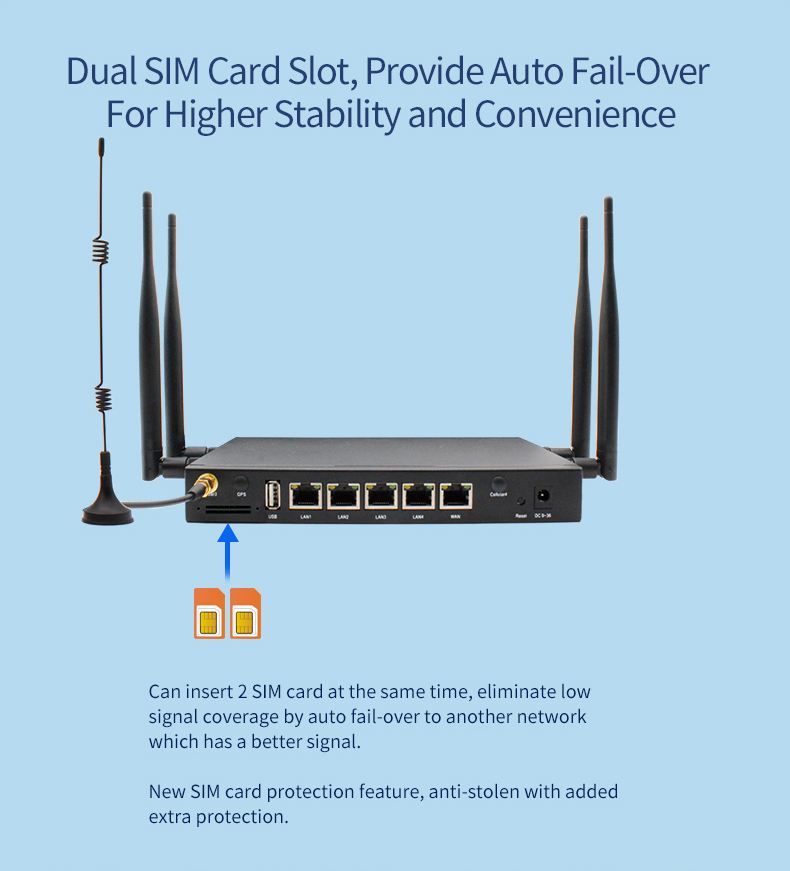
SIM card management: Make sure the SIM card is properly installed and check the signal strength. Some routers support remote SIM card management, allowing administrators to view traffic usage and activate or deactivate SIM cards through the management interface.
APN Settings: Correctly configured according to the access point name (APN) provided by the carrier, which is key to ensuring the proper connection of the 4G network.
Data roaming and traffic control: Set whether to allow data roaming based on service requirements, and set the upper limit of traffic usage to avoid additional charges.
optimize the WiFi performance of industrial wireless equipment routers
As an important part of industrial wireless network, the performance of WiFi directly affects the stability and efficiency of data transmission. Here are some optimization suggestions:
Channel selection: Use the wireless scanning tool to check the channel occupancy of the surrounding environment and select the channel with the least interference to reduce signal conflict.
Frequency band selection: Although the 2.4GHz band has a wide coverage, it is susceptible to interference; The 5GHz band is faster and less intrusive, but has limited coverage. Select the appropriate frequency band according to the actual requirements.
Power adjustment: Reasonable adjustment of the router's transmit power, both to ensure coverage needs, but also to reduce energy consumption and interference.
Security Settings: Enable the latest encryption standards such as WPA3, set strong passwords, and change them regularly to ensure the security of the wireless network.
advanced management functions and security strengthening
In addition to the basic configuration, industrial wireless device routers support a variety of advanced management features and security policies to meet the needs of complex industrial scenarios:
VLAN division: The virtual local area network (VLAN) technology divides the network into multiple independent areas logically, improving network security and management efficiency.
Access control lists (ACLs) : Define detailed access rules to restrict access to specific IP addresses or MAC addresses, enhancing network security.
Remote management and monitoring: Using SNMP, TR-069 and other protocols to achieve remote configuration of routers, status monitoring and fault alarm, improve operation and maintenance efficiency.
Firmware upgrade: Check and upgrade the router firmware regularly to get the latest security patches and feature improvements.
Industrial wireless device routers, especially those with integrated 4G and WiFi capabilities, are an indispensable part of modern industrial communication networks. Mastering its management skills can not only ensure the stable operation of the network, but also effectively improve production efficiency and security. This comprehensive guide from basic login to advanced management is designed to provide technical personnel and managers with practical operational guidance to help build a smarter and more reliable industrial communications environment. With the continuous progress of technology, the management of industrial wireless equipment routers in the future will be more intelligent and automated, laying a solid foundation for the in-depth development of Industry 4.0.
