

In the industrial field, the stable and efficient operation of routers is crucial, and the adjustment of industrial routers, industrial 4G routers and industrial WiFi routers is the key to ensure the smooth network. Here are some practical ways to adjust.industrial router
Hardware connection and placement adjustment
Choose the right installation location: Industrial routers should be installed in a dry, well-ventilated and suitable temperature environment, away from strong electromagnetic interference sources such as large motors and transformers. At the same time, the router is placed in a higher position, such as the upper part of the cabinet, to reduce obstacles to block signals and improve signal coverage.
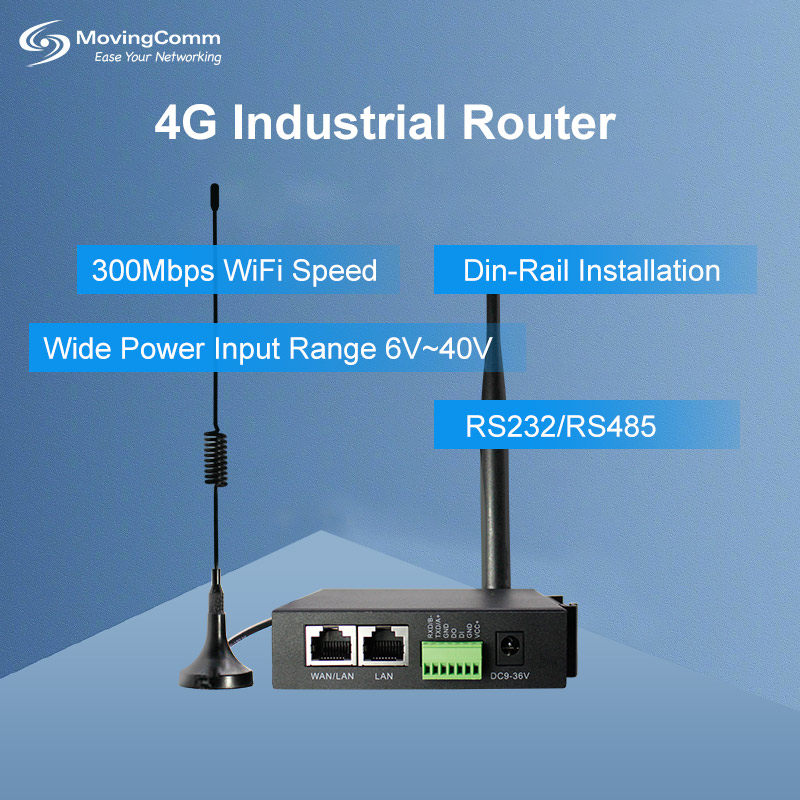
Correctly connect the line: Carefully check whether the power supply, network cable, antenna and other connections are firm, and ensure that the 4G SIM card of the industrial 4G router is correct and in good contact. For routers with multiple network ports, make a clear distinction between the WAN port and the LAN port, connect the external network to the WAN port, and connect the internal device to the LAN port.4G industrial router
Adjust network parameter Settings
Hardware connection and placement adjustment
Choose the right installation location: Industrial routers should be installed in a dry, well-ventilated and suitable temperature environment, away from strong electromagnetic interference sources such as large motors and transformers. At the same time, the router is placed in a higher position, such as the upper part of the cabinet, to reduce obstacles to block signals and improve signal coverage.
Correctly connect the line: Carefully check whether the power supply, network cable, antenna and other connections are firm, and ensure that the 4G SIM card of the industrial 4G router is correct and in good contact. For routers with multiple network ports, make a clear distinction between the WAN port and the LAN port, connect the external network to the WAN port, and connect the internal device to the LAN port.4G industrial router
Adjust network parameter Settings
Frequency band and channel selection: there are many devices in the industrial environment, and the signal interference is more serious. If the industrial router supports dual-band, it is recommended to preferentially use the 5GHz band, which has fast transmission speed and less interference. Applications such as professional spectrum analysis tools or WiFi analyzers can scan the surrounding wireless signals and select channels with less interference.
IP address and subnet mask Settings: Set a fixed IP address for a router based on the industrial network plan, and properly configure the subnet mask, gateway, and DNS server address. If multiple routers are cascaded, ensure that the IP addresses of the routers are on different network segments to avoid IP address conflict.
Bandwidth allocation and traffic control: Use the bandwidth management function of the router to allocate reasonable bandwidth resources for different devices or applications according to the importance of devices and service requirements. For industrial surveillance video, PLC data transmission and other services with high real-time requirements, high bandwidth can be allocated.wireless router
Safety setting adjustment
Safety setting adjustment
Firewall Settings: Enable the firewall function of industrial routers and set access rules based on the source IP address, destination IP address, and port number to prevent unauthorized devices from accessing the industrial network. At the same time, the firewall rules are regularly updated to cope with emerging security threats.
VPN configuration: In scenarios where remote access to industrial networks is required, configuring a virtual private network (VPN) is an effective means to ensure data security. You can select VPN protocols such as IPsec, PPTP, and L2TP, and set the VPN server address, account, and password.
User authentication and access control: Set complex and uncrackable router management passwords and change them regularly. At the same time, enable the MAC address filtering function to allow only authorized device MAC addresses to connect to the router's WiFi network, preventing unauthorized devices from accessing the router.
 Other functional adjustment
Wireless signal strength adjustment: General industrial routers have wireless signal strength adjustment options, which can be adjusted according to actual needs. In the area where the signal coverage is insufficient, the signal strength can be appropriately enhanced; If there is a signal interference problem, the signal strength can be reduced to reduce the interference range.
QoS Settings: Quality of Service (QoS) is the quality of service. You can set QoS rules to prioritize different types of network traffic. For example, the traffic priority of industrial control instructions is set to the highest to ensure that it can be preferentially transmitted when the network is congested to ensure the stability of industrial production.
Device management and maintenance: Periodically log in to the management page of the router to view device operating status, including CPU usage, memory usage, and network connection number. You can set the router to automatically restart at regular intervals to release system resources and solve potential software problems.
